THE RULES OF LOGARITHMIC COMPUTATION
Just as it is true of calculating with powers, a few rules have to be followed when we are calculating with logarithms. In the following exercises the computer (more exactly the DERIVE program) will help you to learn three rules which have to be followed when we are calculating with natural logarithms. All expressions will be entered as “expression =”. The equals sign at the end of each expression will ensure instant simplification of all expressions.
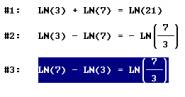
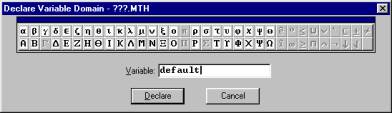
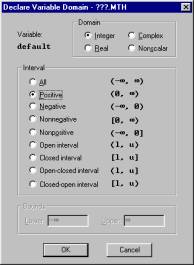
Since all computations will be done with natural numbers only, DERIVE should be set appropriately, namely so that all variables are assumed to be natural numbers. This can be done with Declare/Variable domain. In version 4 “default” has to be typed in and in the window that appears “integer” and “positive” have to be chosen.
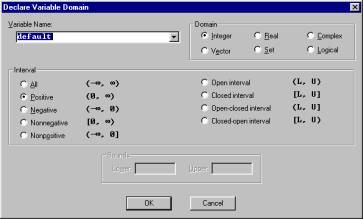
In version 5, however, both windows have been combined into a single window.
DERIVE writes the expression in the following way:

From now on DERIVE will automatically assume all variables to be natural numbers.
LOGARITHMIC ADDITION
Enter the following expressions and write down the results:
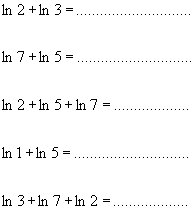
Now symbolically write the rule for logarithmic addition:

Check whether DERIVE agrees with the rule you had written by entering the same expression:

Express the rule in words:
…………………………………………………………………………………………………
…………………………………………………………………………………………………
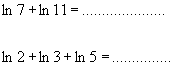
Calculate the next two examples without the computer and then check the solutions with DERIVE.
LOGARITHMIC SUBTRACTION
Simplify the following expressions:
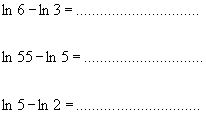
Write the rule for logarithmic subtraction symbolically:

Check your rule by entering it into DERIVE

Now express the rule in words:
……………………………………………………………………………………
……………………………………………………………………………………
Solve the following expressions and check your solutions with the help of your computer.

POWERS
The expression 23 is entered as 2^3. The power symbol is typed with the following combination of keys: Alt Gr, and 3. However, it will only appear after the exponent has been entered or the space bar pressed. In DERIVE for Windows 5 the power symbol can also be entered by clicking the sixth button in the top line of the right hand tool box which is found at the bottom of the screen.

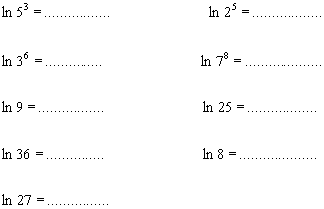
Write the rule:

In words:
. . . . . . . . . . . . . . . . . . . . . . . . . . . . . . . . . . . . . . . . . . . . . . . . . . . . . . . . . . . . . . . . . . . . . . . . . . . .
. . . . . . . . . . . . . . . . . . . . . . . . . . . . . . . . . . . . . . . . . . . . . . . . . . . . . . . . . . . . . . . . . . . . . . . . . . . .
Check the validity of your conclusion with three more examples. Calculate them first without and then with the help of your computer.
